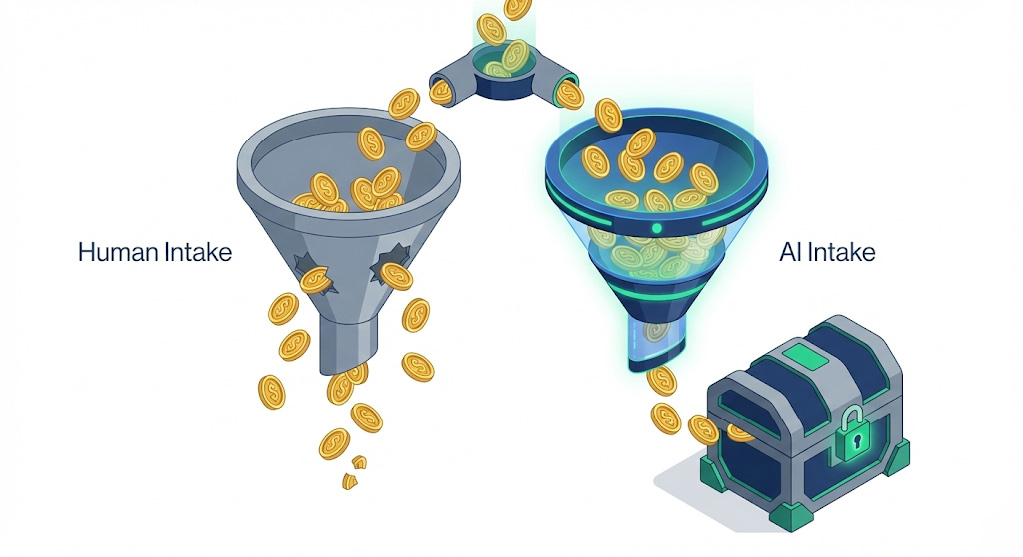
How to Use AI Tools to Improve Email Marketing Campaigns
Quick Answer: AI + Campaign Emails
Artificial Intelligence (AI) improves campaign emails by automating data analysis, segmenting audiences based on behavior, and drafting personalized copy at scale. While AI tools can generate subject lines and body text, they are most effective when used to analyze subscriber data and optimize send times. The best results come from a “human-in-the-loop” approach, where AI handles the data and drafting, while human marketers ensure brand voice and strategy alignment.
For small businesses with lean marketing teams, the inbox is a battlefield. You are competing not just with competitors, but with family updates, shipping notifications, and the general noise of daily life.
To win attention, your campaign emails must be relevant, timely, and engaging. Historically, achieving this requires a team of data analysts and copywriters. Today, AI tools bridge that resource gap, allowing a team of one to execute strategies that previously required a team of ten.
This guide explains how to do an email campaign using AI, grounded in marketing psychology and practical workflows.
What is an email campaign?
An email campaign is a coordinated set of individual email messages deployed across a specific period of time with a specific purpose. These emails are sent to a segment of your contact list and are designed to achieve a measurable goal, such as nurturing leads, promoting a new product, or re-engaging inactive customers.
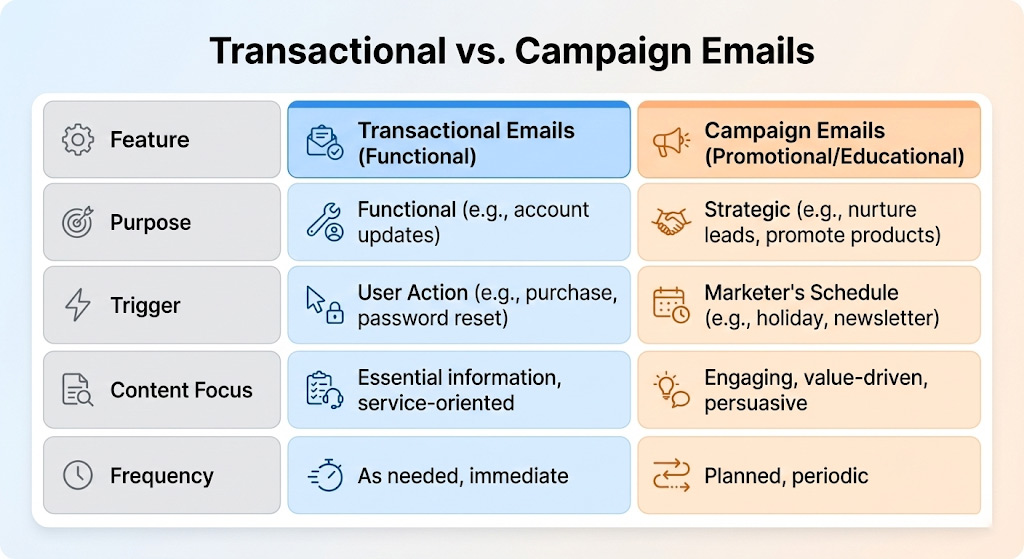
It is important to distinguish these from transactional emails.
- Transactional Emails: Triggered by a user action (e.g., password reset, order confirmation). These are functional.
- Campaign Emails: Driven by the marketer’s strategy (e.g., newsletter, holiday sale). These are promotional or educational.
To optimize campaign emails, you need to move beyond “batch and blast” tactics. This is where AI becomes your force multiplier.
Why AI improves campaign emails (The Psychology)
AI doesn’t just make you faster; it makes your marketing more psychologically persuasive. Effective marketing relies on connecting with human needs. AI tools help you apply these psychological principles at scale.
1. The Cocktail Party Effect (Relevance)
Psychology tells us that humans can tune out a room full of noise but will immediately snap to attention if they hear their own name or a topic they care deeply about. This is the Cocktail Party Effect.
AI analyzes customer browsing history and past purchases to ensure your campaign emails reference specific interests, simulating this effect. Instead of a generic “Check out our sale,” AI helps you send “Here are 3 tools to help with the project you started yesterday.”
2. Reducing Cognitive Load
Cognitive load is the amount of mental effort required to process information. If an email is cluttered or irrelevant, the reader deletes it to save mental energy. AI tools can analyze your copy for readability, suggesting simpler sentence structures and clearer calls-to-action (CTAs) that respect the reader’s time and attention.
How to do an email campaign with AI
Integrating AI into your workflow requires a structured approach. Do not treat AI as a “magic button” that does the work for you. Treat it as a junior analyst and copywriter that needs clear instructions.
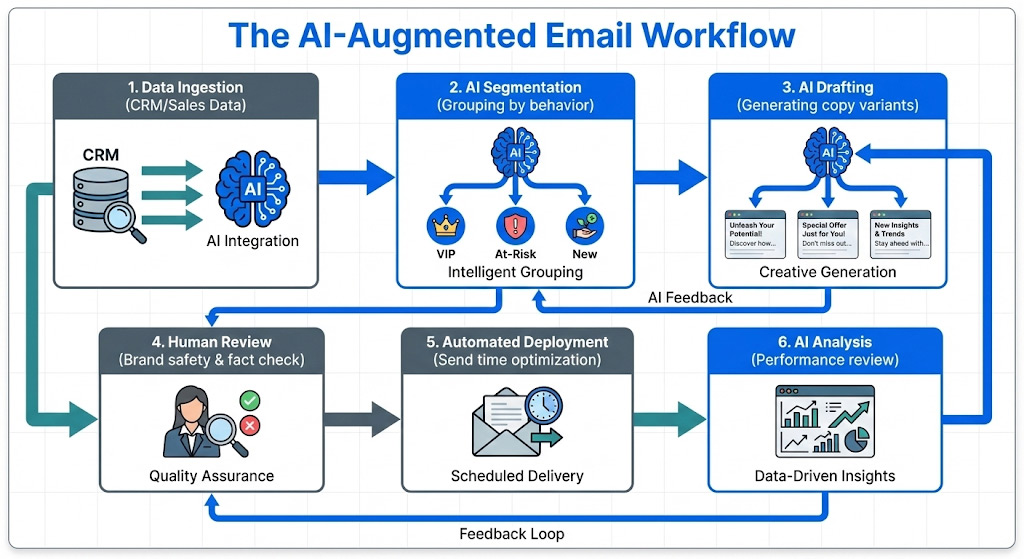
Phase 1: Segmentation & Data Analysis
Before writing a single word, use AI to organize your data.
- Clustering: Upload anonymized customer data (purchase frequency, average order value) into an AI analysis tool. Ask it to identify patterns. You may find a segment of “VIPs who only buy on weekends” or “window shoppers who click but never buy.”
- Predictive Targeting: Many modern Email Service Providers (ESPs) use AI to predict which users are likely to churn. You can preemptively target these users with a re-engagement campaign.
Phase 2: Ideation & Drafting
Use generative AI (like ChatGPT, Claude, or Jasper) to overcome the “blank page” problem.
- Drafting: Feed the AI your campaign goal and audience persona. Ask for 5 different subject line angles (e.g., curiosity, urgency, benefit-driven).
- Personalization: Use AI to rewrite a generic paragraph into three variations: one for new leads, one for loyal customers, and one for lapsed users.
Phase 3: Testing & Optimization
Email campaign analysis is often retroactive, but AI makes it proactive.
- Send Time Optimization: AI tools analyze when each individual subscriber historically opens their email. Instead of sending a blast at 9:00 AM, the tool delivers the email at 9:00 AM for User A and 8:00 PM for User B.
- A/B Testing: AI can automate multivariate testing, testing dozens of subject line and preview text combinations simultaneously and auto-selecting the winner after a small sample size.
AI Email Marketing Tools: What to use them for
You likely already have access to AI tools without realizing it. Here is how to categorize them:
| Tool Category | What to use them for |
| Generative AI (e.g., ChatGPT, Claude) | Brainstorming angles, drafting body copy, summarizing long content for newsletters, and creating segmentation logic. |
| AI-Enhanced ESPs (e.g., HubSpot, Klaviyo, Mailchimp) | These platforms send the emails. Use their built-in AI for send-time optimization, predictive analytics, and product recommendations. |
| Optimization Tools (e.g., Seventh Sense, Phrasee) | Specialized tools that plug into your ESP to optimize subject lines using natural language generation or manage frequency capping to prevent burnout. |
| Data Hygiene Tools (e.g., NeverBounce) | Ensuring your list is clean. AI helps pattern-match bot emails and spam traps to protect your deliverability. |
2-Week Campaign Timeline
For a small team, a 2-week sprint is an efficient way to launch high-quality campaign emails.
Week 1: Strategy & Assets
- Monday: Define the goal (e.g., drive registrations for a webinar). Export data.
- Tuesday: Use AI to analyze the list and create 3 distinct segments (e.g., highly engaged, casual readers, cold leads).
- Wednesday: Draft copy using AI prompts. Generate 10 subject lines per segment.
- Thursday: Human review. Check for brand voice accuracy and hallucinated facts. Select visuals.
- Friday: Set up the campaign in your ESP. Configure A/B tests for subject lines.
Week 2: Launch & Learn
- Monday: Launch the campaign using AI send-time optimization (smart send).
- Wednesday: Mid-campaign check. Pause underperforming variants if your tool doesn’t do this automatically.
- Friday: Email campaign analysis. Feed the performance data back into your AI tool to generate a “Lessons Learned” summary for the next campaign.
3 Practical AI Prompts for Marketers
Copy and paste these prompts into your preferred LLM to speed up your workflow.
1. The Segmentation Strategist
“I am selling [Product Name], which helps solve [Problem]. I have a list of 5,000 subscribers. Based on behavioral psychology, suggest 3 distinct subscriber segments I should target for an upcoming [Holiday/Event] sale. For each segment, explain the primary motivation (e.g., fear of missing out, desire for status, bargain hunting).”
2. The Subject Line Generator
“Write 10 subject lines for an email promoting a. The goal is to maximize open rates. Use a mix of psychological triggers: 3 based on curiosity, 3 based on urgency, and 4 based on direct benefit. Keep them under 50 characters.”
3. The “Uncanny Valley” Check
“Review the following email draft. Does it sound robotic or generic? Rewrite the opening paragraph to sound more conversational and empathetic, as if it were written by a founder to a trusted colleague. Use active voice.”
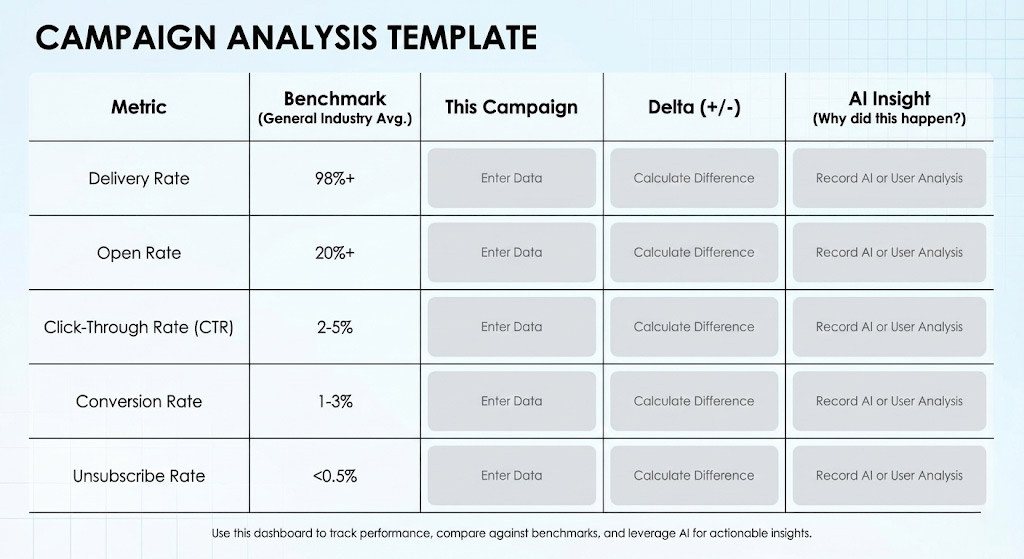
Email campaign analysis: what to measure and why
Running the campaign is only half the battle. Email campaign analysis tells you what worked. Do not just look at vanity metrics; look for actionable insights.
Metric Checklist:
- Delivery Rate: Are you reaching the inbox? (Aim for 98%+).
- Open Rate: Indicates relevance of the subject line and sender name.
- Click-Through Rate (CTR): Indicates the effectiveness of the body copy and offer.
- Conversion Rate: The percentage of people who completed the goal (bought, signed up).
- Unsubscribe Rate: A high rate here indicates a mismatch between content and audience expectations.
3 Sample Campaign Angles
If you are stuck on ideas, use these three proven frameworks for your campaign emails.
1. The “Educate & Pivot” (Nurture)
- Intent: Build trust.
- Content: Use AI to summarize a recent industry trend or news event. Offer 3 bullet points of value.
- The Pivot: In the final sentence, mention how your product helps navigate this trend.
- Psychology: Reciprocity—you gave them value first, so they are more likely to click.
2. The “Did You Miss This?” (Re-engagement)
- Intent: Wake up cold subscribers.
- Content: Ask AI to analyze your top-performing blog post or product of the last year. Resend the “greatest hits” content to people who haven’t opened emails in 90 days.
- Psychology: Social Proof—showing them what others found valuable creates a fear of missing out (FOMO).
3. The “Flash Insight” (Promotion)
- Intent: Drive immediate sales.
- Content: A short, punchy email focused on a single specific problem your customer faces right now.
- Psychology: Specificity—general offers are ignored; specific solutions grab attention.
Common Mistakes When Using AI in Email
While powerful, AI email marketing tools introduce new risks. Avoid these pitfalls to protect your brand.
The “Uncanny Valley” of Text
When the copy is almost human but slightly “off,” it creates a feeling of unease known as the uncanny valley. AI often overuses buzzwords like “game-changer,” “unlock,” or “landscape.” Always have a human editor review copy to ensure it sounds like you.
Over-Personalization (The “Creep Factor”)
Just because AI can insert a customer’s pet’s name into a subject line doesn’t mean it should. Personalization should feel helpful, not intrusive. Stick to behavioral data (what they bought/viewed) rather than demographic data (where they live) unless necessary.
Compliance & Deliverability
AI can generate thousands of emails in seconds, but sending too many too fast will trigger spam filters. Ensure your AI tools respect frequency caps. Furthermore, never ask AI to generate email lists for you—this violates GDPR and CAN-SPAM regulations. Only market to people who have explicitly opted in.
Action Checklist
- [ ] Audit: Review your last 3 campaign emails. What was the primary goal?
- [ ] Select Tool: Choose one AI writing tool for drafting and check if your current ESP has AI features you aren’t using.
- [ ] Segment: Use AI to identify your “VIP” and “At-Risk” customers.
- [ ] Draft: Generate 3 subject line variants for your next campaign.
- [ ] Test: Run an A/B test on your next send.
- [ ] Analyze: Review the data. Did the AI variant outperform the control?
Frequently Asked Questions (FAQ)
- Can AI write my entire email campaign?
AI can draft the content, but it should not be the final publisher. AI lacks the nuance of your specific brand voice and may “hallucinate” facts. Always edit AI-generated drafts.
- What is the best AI tool for email marketing?
There is no single “best” tool. For writing, ChatGPT or Claude are excellent. For sending and optimization, platforms like HubSpot, Klaviyo, or Brevo are industry standards for small businesses.
- Will using AI affect my email deliverability?
AI itself does not hurt deliverability, but how you use it does. If you use AI to spam thousands of people with irrelevant content, your domain reputation will suffer. If you use AI to send highly relevant content to segmented lists, your deliverability will improve.
- How do I measure email campaign success?
Focus on conversion rate and revenue per recipient. Open rates are less reliable due to privacy updates (like Apple’s Mail Privacy Protection), so focus on clicks and actions.
- Is it expensive to use AI for email marketing?
cNot necessarily. Many AI writing tools have free tiers, and many Email Service Providers (ESPs) include AI features in their standard subscription packages.
Glossary of Key Terms
- A/B Testing: Sending two variations of an email to a small percentage of your list to see which performs better before sending the winner to the rest.
- Campaign Emails: Marketing emails sent to a list of subscribers with a specific promotional or educational goal.
- ESP (Email Service Provider): The software platform used to manage contacts and send emails (e.g., Mailchimp, Constant Contact).
- Hallucination: When an AI generates false or invented information confidently.
- Open Rate: The percentage of recipients who opened your email. (Note: Often inflated by privacy settings).
- Segmentation: Dividing your email list into smaller groups based on specific criteria (location, purchase history, behavior) to send more relevant content.
- Transactional Email: Automated emails triggered by user behavior (receipts, password resets).
Next Steps:
Ready to improve your results? Start by auditing your existing email workflow. Look for the “bottleneck”—is it writing the copy? Segmenting the list? Analyzing the data? Apply one AI tool to that specific bottleneck this week.